
If you want to buy a game or add a little more to your purchases, check your inbox now.
More stories in the category Xbox Live
- Xbox is offering five free games this weekend and one of them for the whole world
- These have been the 50 most played games on Xbox this week
- Three games already have a date to close their servers on Xbox
| Don't miss anything and follow us on Google News! |
It’s no surprise that around this time, Xbox starts giving gifts to its user community. From 1 month of Game Pass to Gift Cards, like the one in this case. It seems that certain users are being randomly selected to win one of these cards.
The Gift Cards they’re offering are worth $10 (10 euros, following Microsoft’s traditional conversion), and are being sent to any user with an Xbox account, regardless of whether they play on console, PC, or Cloud. So, check your inbox just in case.
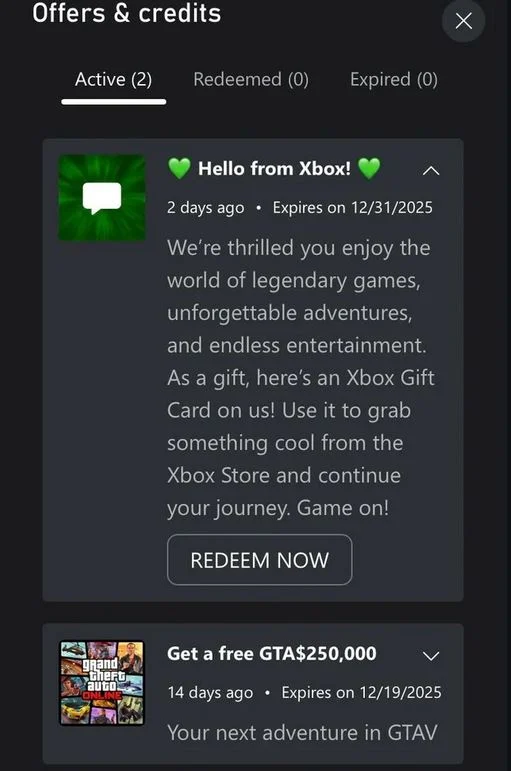
Xbox’s Thank You Message
The message starts with a simple “Hello from Xbox!” and continues with a text thanking the user for enjoying a “world of legendary games, unforgettable adventures, and limitless entertainment”. It may seem like a small thing, but $10 can go a long way, especially since there are currently active deals with games for less than that amount or even games that are almost free with a little extra.
It doesn’t seem like this promo is limited to US users, as is often the case, so it’s possible you’ve received one too.
To redeem a Gift Card, simply follow these steps:
From the Console
- Open the Guide: Press the Xbox button in the center of your controller to open the guide.
- Go to the Store: Scroll to the Store tab.
- Select Redeem: Within the Store, press the button with two overlapping squares to open the side menu, or search and select the Redeem option.
- Enter the code: Enter the 25-character code from your gift card (in the format XXXXX-XXXXX-XXXXX-XXXXX-XXXXX). Confirm:
- Select Next and follow the instructions to confirm the redemption.
- The funds or content will be added to your account.
From the Browser
This is the most universal method and works on any device (PC, mobile, or tablet).
- Visit the website: Open your browser and go to redeem.microsoft.com or xbox.com/es-ES/redeem.
- Sign In: Sign in with the Microsoft account associated with your Xbox profile.
- Enter the Code: Enter the 25-character code from your gift card.
- Confirm: Click Next and follow the instructions to complete the redemption.
Have you been selected? Share it with us in the comments. By the way, the promotion ends on December 31, 2025.


Jose Angel is one of the founders of Generación Xbox, Universo Samsung and Reflotes. He has been managing all the group's websites since 2014 and has extensive experience in the video games sector and has provided exclusive sources for the website. He has also interviewed numerous personalities from the video game world. Jose Angel has reviewed more than 200 games, and usually rates them with an average score of 75 out of 100 according to Open Critic. He also writes and manages Samsung Universe.
Related Post